Landscaping estimating software: what actually prices a job

Landscaping estimating is not takeoff
Worth saying plainly, because it separates this page from most of the “estimating software” category.
On HVAC, plumbing, electrical, drywall and masonry, “estimating software” means commercial takeoff: loading a plan set and measuring off drawings to produce a bid. Those are a different product category from field service software, sold to commercial contractors.
Landscaping mostly is not that. There is rarely a drawing. Landscape estimating means measure the area, estimate the hours, apply a rate you have actually costed, add materials and disposal. The hard part is the rate, not the measurement.
That reframes what to look for: a tool that measures quickly and turns a number into a professional quote, plus your own honest rate build-up behind it.
The rate is the estimate
No software will fix a rate you guessed. Before comparing tools, know what an hour of your crew costs you with overhead, equipment, fuel, insurance and downtime included. Landscape-specific platforms like LMN and SingleOps build this in; with a general tool you do it in a spreadsheet once a year.
| Tool | Starts at | Users included | Best for | Verdict |
|---|---|---|---|---|
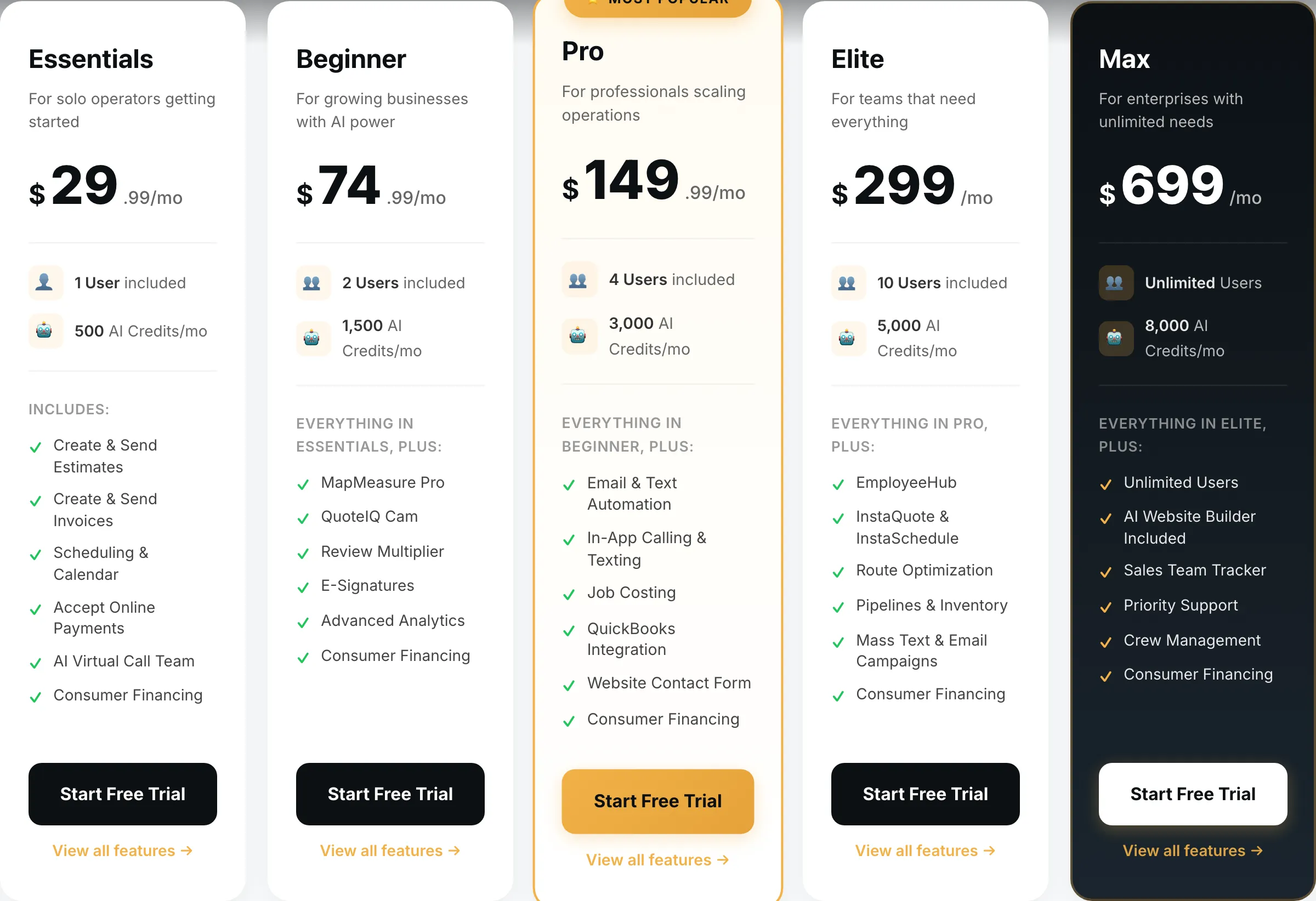
| QuoteIQ | $29.99/mo | 1 | Solo and small crews | Measures the property; cheapest |
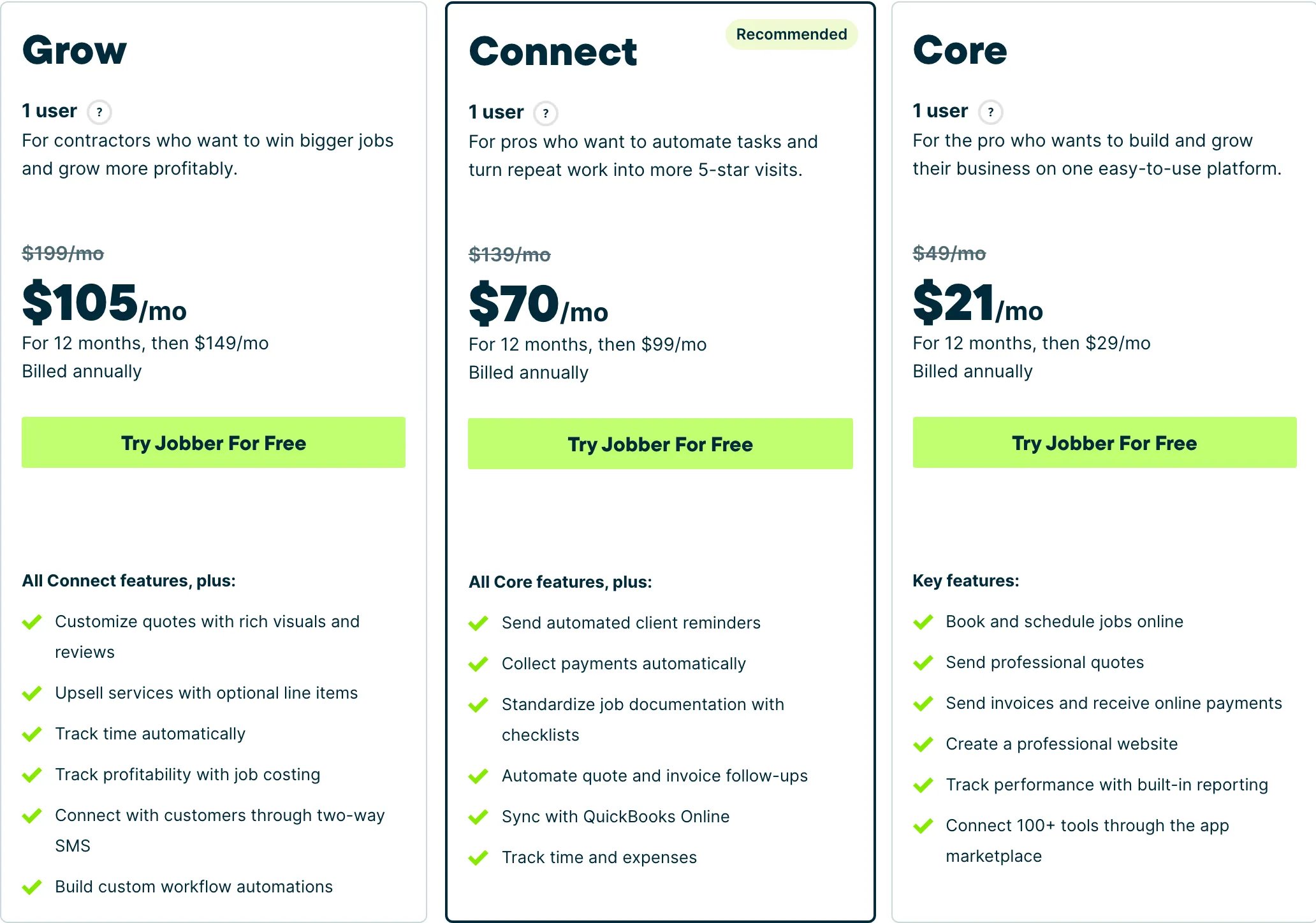
| Jobber | $49/mo | 1 | One to four people | Best quoting and job handling |
| Housecall Pro | $79/mo | 1 | Five or more | Proposal tool for tiered designs |
| ServiceTitan | Quote only | Unlimited | Large service operations | Quote-only, wrong trade |
QuoteIQ — the only one that measures
$29.99/mo · Solo and small crewsField service software built for exterior cleaning and outdoor home service crews, with property measurement baked into the quote.
MapMeasure Pro traces lawns, beds, patios and driveways on satellite imagery and puts the square footage straight into the quote. For a trade where every estimate starts with an area, that removes the measuring step entirely.
At $29.99/mo it is also the cheapest, though MapMeasure Pro itself starts on the Beginner plan at $74.99.
What it does well
- Cheapest real entry point of anything in this category — $29.99 gets a working quote-to-invoice loop, not a crippled trial tier.
- MapMeasure Pro measures a property off satellite imagery, which is the actual job on a lawn, driveway or roof quote.
- Every tier includes the features. No add-on menu bolted on at checkout.
What it does badly
- Smaller company than the incumbents. Fewer integrations, and you will occasionally be the person filing the bug.
- Built around exterior and outdoor trades. If you run commercial mechanical, this is the wrong shape.
- Seat counts are tight below Elite — a four-person crew is already on the $149.99 tier.
Who it fits: Solo operator to a four-person crew, mostly exterior cleaning and outdoor work.
Jobber — best quoting and job handling
$49/mo · One to four peopleThe default field service platform for small home service businesses, and the one most operators compare everything else against.
No measurement, but the best quote your customer will open and the strongest handling of the mixed maintenance-and-install calendar a landscape business actually runs. Optional line items on Grow at $199 let a customer choose their specification level.
Core is $49/mo plus $29 per seat.
What it does well
- The most polished product in the category. Onboarding is fast and the mobile app is the one crews complain about least.
- Client-facing experience — booking page, quote approvals, payment — is a step above everything cheaper.
- Deepest integration list, so it fits whatever you already run the books in.
What it does badly
- The advertised entry price is one user. Seats are $29/mo each on every tier, so a three-person crew on Core is $107/mo, not $49.
- Automation that most operators consider essential — reminders, follow-ups — is Connect and up, a 2.8x jump from Core.
- Prepaid annual pricing is what the marketing quotes; the no-commitment monthly number is meaningfully higher.
Who it fits: One person to a mid-size crew. The Core tier is genuinely usable solo; the useful automation starts at Connect.
Housecall Pro — for tiered install proposals
$79/mo · Five or moreJobber’s closest competitor, priced for teams rather than solos, with stronger dispatch and marketing tooling.
Essentials at $189/mo includes five seats; the Max proposal tool at $329 presents three specification levels, which suits install and design work.
What it does well
- Five seats included on Essentials is the best seat-per-dollar deal of the three once you are past two people.
- Dispatch and routing are stronger than Jobber’s at the equivalent tier.
- Recurring service plans on Max are genuinely good if you sell maintenance contracts.
What it does badly
- Worst entry price in the category: $79/mo for a single user, 60% more than Jobber Core for less.
- Extra seats on Essentials are $100/mo — the most expensive seat of any tool here.
- Add-on pricing is not published. You will get those numbers on a sales call, not off the website.
Who it fits: Two to eight people. The seat maths only starts working in your favour once you have a crew.
ServiceTitan is built for dispatched skilled-trade service calls and is named here for completeness; quote-only pricing, an annual contract, a paid implementation.
How we picked
Prices read off each vendor’s pricing page on 31 August 2026, no-commitment monthly rate with seats added. We weighted measurement speed, optioned quote presentation and whether the tool handles both maintenance and install work.
We earn nothing from Jobber or ServiceTitan.
What we would do
Solo, install-heavy: QuoteIQ Beginner at $74.99 for MapMeasure Pro.
One to four, mixed maintenance and install: Jobber Core at $49, Grow at $199 for options.
Several crews wanting true costed rates: price LMN or SingleOps.
Questions operators actually ask
What is landscaping estimating software?
Unlike HVAC or drywall, landscaping estimating is mostly not plan takeoff — there is rarely a drawing to measure off. It means turning an area measurement plus your labour and material rates into a price. Some landscape-specific platforms such as LMN and SingleOps build estimating around a costed labour rate, which is the serious version of this.
How should I build a landscape estimate?
From a costed hourly rate that includes your overhead, not from a number you guessed. Measure the area, estimate the hours, apply the rate, add materials with a markup and a disposal line. Landscapers who price from what the last guy charged rather than from their own costs are the ones who stay busy and broke.
Can any of these measure a property?
QuoteIQ does, via satellite imagery — trace a lawn, a bed or a patio and the square footage drops into the quote. Jobber, Housecall Pro and ServiceTitan do not measure at all; you measure elsewhere and type the number in.
Should I present design options?
Yes, on install work. A planting scheme or a patio at three specification levels lets the customer choose a budget rather than negotiate yours down. On maintenance contracts it matters less — those are won on reliability and price.
Do I need landscape-specific software like LMN?
It becomes worth pricing once you have several crews and want true costed labour rates and job costing across a season. Below that, a general tool plus a spreadsheet for your rate build-up covers it. We have not verified LMN's pricing so there are no figures here.