The best kitchen remodeling software in 2026

The short version
- Best of these for a small remodel crew
- Jobber — Multi-week jobs, deposits and progress billing, with a quote that reassures a nervous homeowner.
- Best cheap option
- QuoteIQ — $29.99/mo with consumer financing on every tier — a real lever at kitchen price points.
- Best for selling packages
- Housecall Pro — The Max proposal tool presents tiers, which is how kitchen budgets get agreed.
Two products, one name
Search “kitchen remodeling software” and you get two categories that do opposite jobs.
Design software — 2020 Design, Chief Architect, SketchUp, Houzz Pro — produces the renderings and layouts that sell the kitchen. It is a sales tool.
Operations software runs the build once it is sold: the quote, the schedule, the deposit, the draws, the final invoice. That is what this page compares.
They are not alternatives to each other. A kitchen remodeler who sells well and invoices badly needs the second one; most already own the first.
Who this is for
One to four people doing kitchens, and probably bathrooms too. Projects that run three to eight weeks, cabinets you order and front, and a customer living without a kitchen while you work — which makes schedule communication unusually important.
The comparison
| Tool | Starts at | Users included | Best for | Verdict |
|---|---|---|---|---|
| Jobber | $49/mo | 1 | One to four person crews | Multi-week jobs, deposits, progress billing |
| QuoteIQ | $29.99/mo | 1 | Solo remodelers | Cheapest; financing on every tier |
| Housecall Pro | $79/mo | 1 | Five or more | Proposal tool for tiered packages |
| ServiceTitan | Quote only | Unlimited | Large service operations | Quote-only, service trades |
Jobber — best of these for a kitchen crew
$49/mo · One to four peopleThe default field service platform for small home service businesses, and the one most operators compare everything else against.
For a crew running one or two kitchens at a time, Jobber covers the money side properly. Jobs span weeks, hold their own material and labour lines, take a deposit at approval and invoice the balance in stages.
The underrated feature for kitchens specifically is client communication. Your customer is washing dishes in a bathroom for six weeks, and automated updates plus a client hub where they can see what is happening next materially reduces the anxious phone calls. That is not a soft benefit — it is hours of your week.
The limits are real and worth knowing before you buy: no Gantt-style timeline, no subcontractor scheduling, no change-order workflow. On a kitchen, where the countertop template date depends on the cabinet install date which depends on the electrical rough-in, those gaps bite sooner than on smaller jobs.
Core is $49/mo plus $29 per seat.
What it does well
- The most polished product in the category. Onboarding is fast and the mobile app is the one crews complain about least.
- Client-facing experience — booking page, quote approvals, payment — is a step above everything cheaper.
- Deepest integration list, so it fits whatever you already run the books in.
What it does badly
- The advertised entry price is one user. Seats are $29/mo each on every tier, so a three-person crew on Core is $107/mo, not $49.
- Automation that most operators consider essential — reminders, follow-ups — is Connect and up, a 2.8x jump from Core.
- Prepaid annual pricing is what the marketing quotes; the no-commitment monthly number is meaningfully higher.
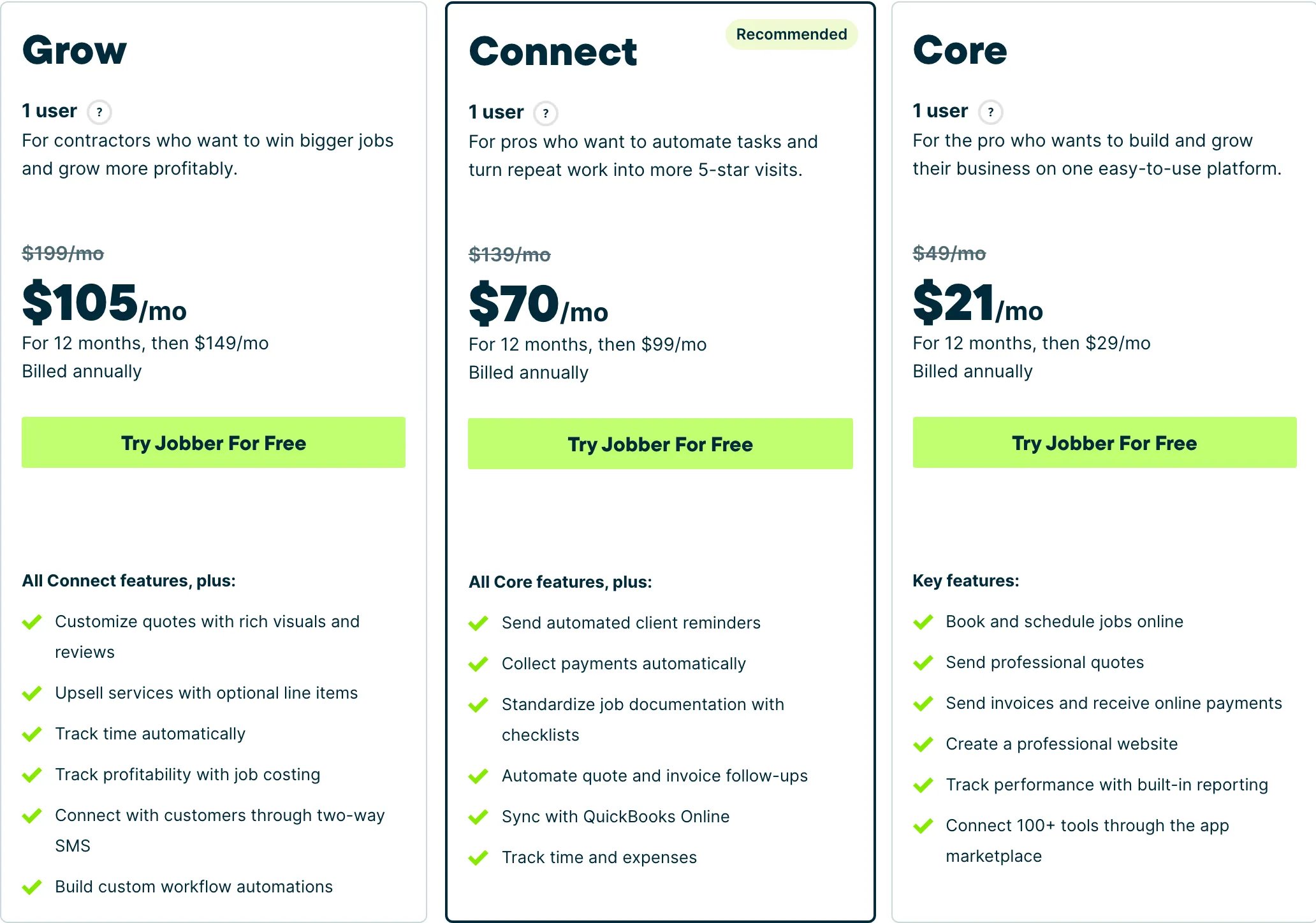
Who it fits: One person to a mid-size crew. The Core tier is genuinely usable solo; the useful automation starts at Connect.
QuoteIQ — best cheap option
$29.99/mo · Solo remodelersField service software built for exterior cleaning and outdoor home service crews, with property measurement baked into the quote.
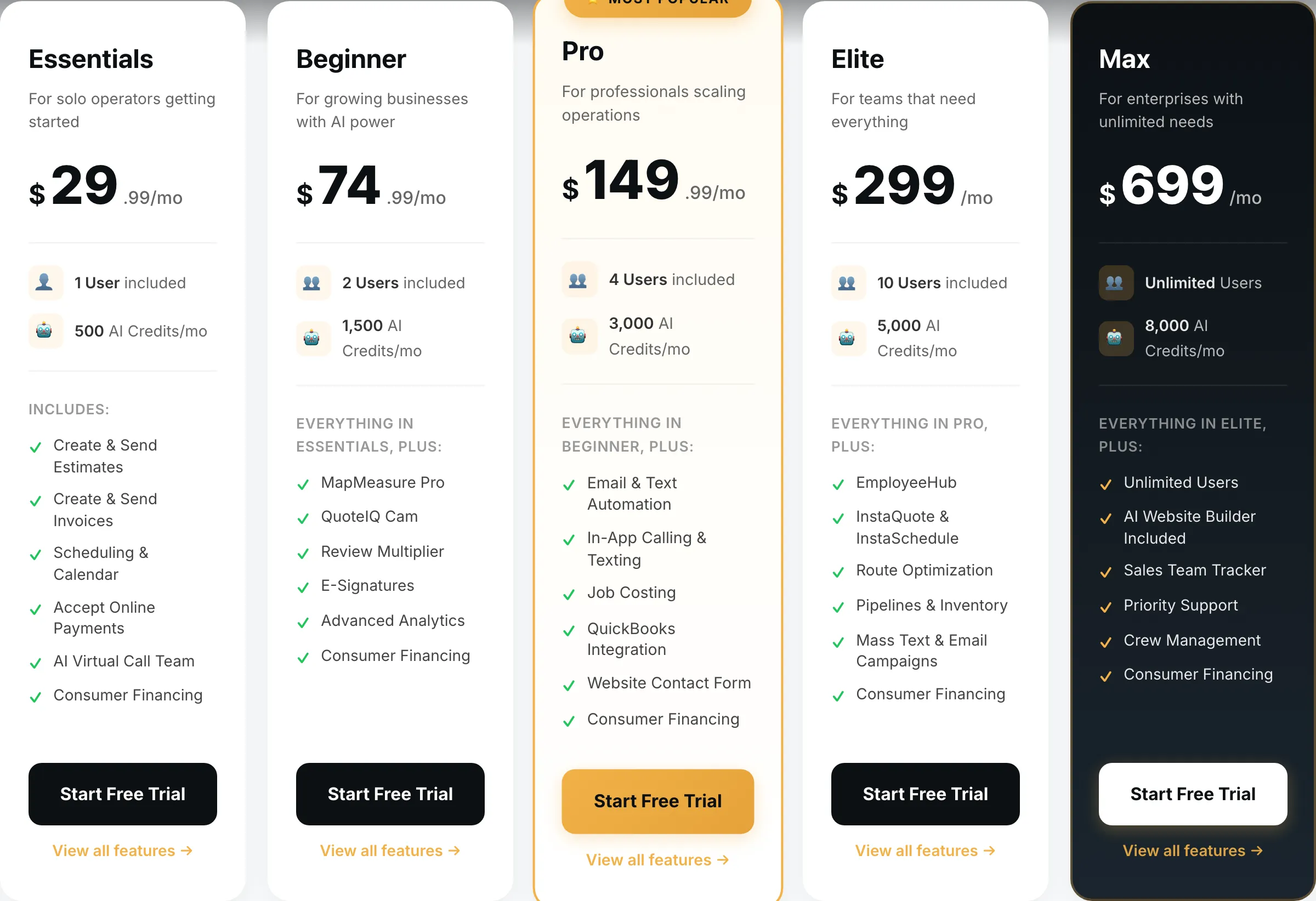
$29.99/mo for quoting, scheduling, invoicing, deposits and payments.
Consumer financing on every tier is the feature that matters most at kitchen price points. A $28,000 kitchen is precisely the purchase where a monthly payment converts a maybe into a yes, and having it in the quote from the cheapest plan is genuinely useful.
Same structural gaps as Jobber and then some: no project timeline, no subcontractor management, and the product’s specialised half is built for exterior trades.
What it does well
- Cheapest real entry point of anything in this category — $29.99 gets a working quote-to-invoice loop, not a crippled trial tier.
- MapMeasure Pro measures a property off satellite imagery, which is the actual job on a lawn, driveway or roof quote.
- Every tier includes the features. No add-on menu bolted on at checkout.
What it does badly
- Smaller company than the incumbents. Fewer integrations, and you will occasionally be the person filing the bug.
- Built around exterior and outdoor trades. If you run commercial mechanical, this is the wrong shape.
- Seat counts are tight below Elite — a four-person crew is already on the $149.99 tier.
Who it fits: Solo operator to a four-person crew, mostly exterior cleaning and outdoor work.
Housecall Pro — best for tiered packages
$79/mo · Five or moreJobber’s closest competitor, priced for teams rather than solos, with stronger dispatch and marketing tooling.
The Max plan’s proposal tool presents good-better-best, which suits kitchens well — a stock cabinet package, a semi-custom one, a full custom one. Homeowners approach kitchens with a budget they have not fully admitted to, and three options is how you find it without a negotiation.
Essentials at $189/mo includes five seats; Max at $329 includes eight with the proposal tool. Add-on pricing is not published, so get it in writing.
What it does well
- Five seats included on Essentials is the best seat-per-dollar deal of the three once you are past two people.
- Dispatch and routing are stronger than Jobber’s at the equivalent tier.
- Recurring service plans on Max are genuinely good if you sell maintenance contracts.
What it does badly
- Worst entry price in the category: $79/mo for a single user, 60% more than Jobber Core for less.
- Extra seats on Essentials are $100/mo — the most expensive seat of any tool here.
- Add-on pricing is not published. You will get those numbers on a sales call, not off the website.
Who it fits: Two to eight people. The seat maths only starts working in your favour once you have a crew.
ServiceTitan — the wrong category
Quote only · Large service operationsEnterprise field service management for multi-truck operations, sold through a sales process rather than a pricing page.
Named because a roundup omitting the market leader is an advertisement.
Built for high-volume dispatched service calls. A kitchen remodel is a multi-week project with subcontractors. No published pricing, an annual contract, a paid implementation.
What it does well
- Nothing else touches it for a large operation: reporting, payroll, inventory, call tracking, financing at the door.
- Built for a business where somebody’s full-time job is dispatch.
What it does badly
- No published pricing, an annual contract and an implementation fee. This is not a tool a solo operator buys.
- For a one to four person crew it is the wrong product at any price — you would use perhaps a tenth of it.
Who it fits: Ten trucks and up, with an office manager whose job includes running the software.
When to move up to construction software
Buildertrend, JobTread and Projul exist for the point where these tools stop working, and for kitchens that point arrives sooner than for most trades. Move when:
- You run more than two projects at once
- Subcontractor scheduling is what goes wrong
- Change orders happen on most jobs
- You need selections and allowances tracked against a budget
We have not verified their pricing, so there are no figures here. Every price on this site is read off the vendor’s own page and dated, and we will not guess at one.
How we picked
Prices read off each vendor’s own pricing page on 31 August 2026, no-commitment monthly rate with seats added.
For kitchen remodeling we weighted multi-week job handling, deposits and staged draws, customer communication during a disruptive build, and financing availability. We treated 3D design as a separate product category rather than scoring these tools on something none of them do.
We earn nothing from Jobber or ServiceTitan, and we have said plainly that past two simultaneous projects the right answer is a category none of us earn anything from.
What we would do
Solo, one kitchen at a time: QuoteIQ at $29.99 for the financing.
Two to four, one or two projects: Jobber Core at $49.
Selling premium packages with a crew: Housecall Pro Max at $329.
Three or more simultaneous projects with subs: none of these — price Buildertrend and JobTread.
Questions operators actually ask
What software do kitchen remodelers use?
Two kinds, often together. Design software — 2020 Design, Chief Architect, SketchUp, Houzz Pro — produces the renderings that sell the kitchen. Operations software runs the build: Jobber or QuoteIQ for small crews, Buildertrend or JobTread for general contractors running several projects at once.
Do I need 3D kitchen design software?
If you sell full kitchens, almost certainly yes. A kitchen is the most expensive room most homeowners will ever renovate and they cannot picture it from a spreadsheet. Design software is a sales cost, not an admin cost, and it belongs in a different line of your budget from the tools on this page.
Can field service software run a kitchen remodel?
For a single-kitchen crew, yes — jobs span weeks, deposits and progress payments work, and material lines sit alongside labour. What you will not get is a project timeline, subcontractor scheduling or a change-order workflow. On kitchens, where cabinets, counters, plumbing and electrical all interlock, those gaps show up faster than on a bathroom.
How should I handle progress payments?
Deposit at signing, a draw when cabinets are delivered, and the balance at completion. Jobber and QuoteIQ both support deposits and partial invoicing. Never let the cabinet order be the first money you spend on a job you have not been paid a deposit for.
When should I move to construction project software?
When you run more than two kitchens at once, when subcontractor scheduling is the thing that goes wrong, or when change orders are frequent enough that tracking them by text has cost you money. That is the point Buildertrend, JobTread and Projul start earning their price.