The best house cleaning software in 2026

The short version
- Best overall for a cleaning business
- Jobber — Recurring visits, two-person team assignment and a client hub that cuts the reschedule calls.
- Best cheap option
- QuoteIQ — $29.99/mo, enough for a solo cleaner who mainly needs quotes and invoices out on time.
- Best for five or more cleaners
- Housecall Pro — Five seats included at $189/mo, where Jobber would be $165 and climbing $29 at a time.
Who this is for
You clean houses. Twenty to eighty regular clients on weekly, fortnightly or monthly cycles, cleaned by you or by teams of two, with a handful of one-off deep cleans and move-outs that pay better than the routine work.
Cleaning is a recurring schedule business with an access problem. The revenue is in visits that repeat without anyone thinking about them, and the operational pain is knowing who has which key, which code, which dog, and which client cannot be visited before ten.
Judge software on those two things.
The comparison
| Tool | Starts at | Users included | Best for | Verdict |
|---|---|---|---|---|
| Jobber | $49/mo | 1 | One to four cleaners | Recurring visits + team assignment + client hub |
| Housecall Pro | $79/mo | 1 | Five to eight cleaners | Five seats at $189, better dispatch |
| QuoteIQ | $29.99/mo | 1 | Solo cleaners | Cheapest; thinner recurring scheduling |
| ServiceTitan | Quote only | Unlimited | Large service operations | Quote-only, wrong trade |
Jobber — best for a cleaning business
$49/mo · One to four cleanersThe default field service platform for small home service businesses, and the one most operators compare everything else against.
Jobber fits cleaning better than any other trade on this site, and it comes down to the client hub.
Cleaning customers reschedule constantly — they are away, they have guests, the builders are in. Every one of those is normally a phone call to you. The client hub lets them see their own schedule, request a change and pay, which removes a genuinely large share of the admin from a cleaning business.
Recurring jobs handle weekly and fortnightly cycles properly. Two-person teams assign to a visit without fuss. Access notes live on the property record, so a covering cleaner sees the door code without ringing you.
Automated reminders — Connect at $139/mo — cut lockouts, which in cleaning is the most expensive failure there is: a team drives out, cannot get in, and you have paid two people for nothing.
Seats at $29 keep it affordable while you are small. Six cleaners is $194/mo, which is where Housecall Pro starts winning.
What it does well
- The most polished product in the category. Onboarding is fast and the mobile app is the one crews complain about least.
- Client-facing experience — booking page, quote approvals, payment — is a step above everything cheaper.
- Deepest integration list, so it fits whatever you already run the books in.
What it does badly
- The advertised entry price is one user. Seats are $29/mo each on every tier, so a three-person crew on Core is $107/mo, not $49.
- Automation that most operators consider essential — reminders, follow-ups — is Connect and up, a 2.8x jump from Core.
- Prepaid annual pricing is what the marketing quotes; the no-commitment monthly number is meaningfully higher.
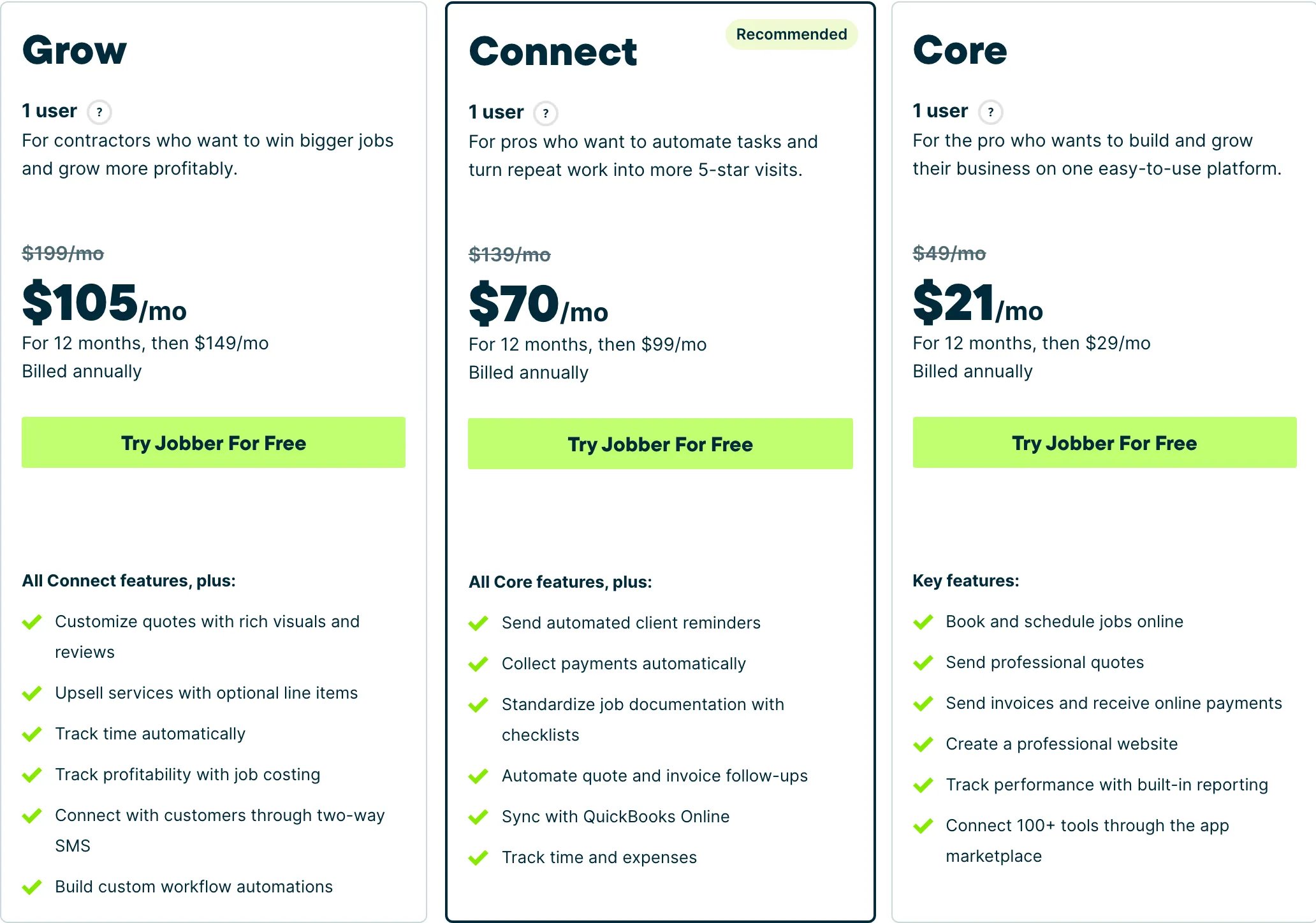
Who it fits: One person to a mid-size crew. The Core tier is genuinely usable solo; the useful automation starts at Connect.
Housecall Pro — best at five or more
$79/mo · Five to eight cleanersJobber’s closest competitor, priced for teams rather than solos, with stronger dispatch and marketing tooling.
The whole case is seats. Essentials includes five at $189/mo flat. Jobber with six users is $194 and rises $29 with every hire; Housecall Pro stays at $189 until the sixth cleaner.
Beyond that, the dispatch board is better for reshuffling a day when a cleaner calls in sick, which in this trade happens weekly. Photo reports are useful for move-out and deep cleans where a customer might dispute the standard of work.
Ignore Basic at $79 for one user — the worst value on this page. And watch the sixth seat at $100/mo: at six cleaners, Max at $329 with eight seats is the better buy than Essentials plus an extra.
What it does well
- Five seats included on Essentials is the best seat-per-dollar deal of the three once you are past two people.
- Dispatch and routing are stronger than Jobber’s at the equivalent tier.
- Recurring service plans on Max are genuinely good if you sell maintenance contracts.
What it does badly
- Worst entry price in the category: $79/mo for a single user, 60% more than Jobber Core for less.
- Extra seats on Essentials are $100/mo — the most expensive seat of any tool here.
- Add-on pricing is not published. You will get those numbers on a sales call, not off the website.
Who it fits: Two to eight people. The seat maths only starts working in your favour once you have a crew.
QuoteIQ — cheapest, and honest about the fit
$29.99/mo · Solo cleanersField service software built for exterior cleaning and outdoor home service crews, with property measurement baked into the quote.
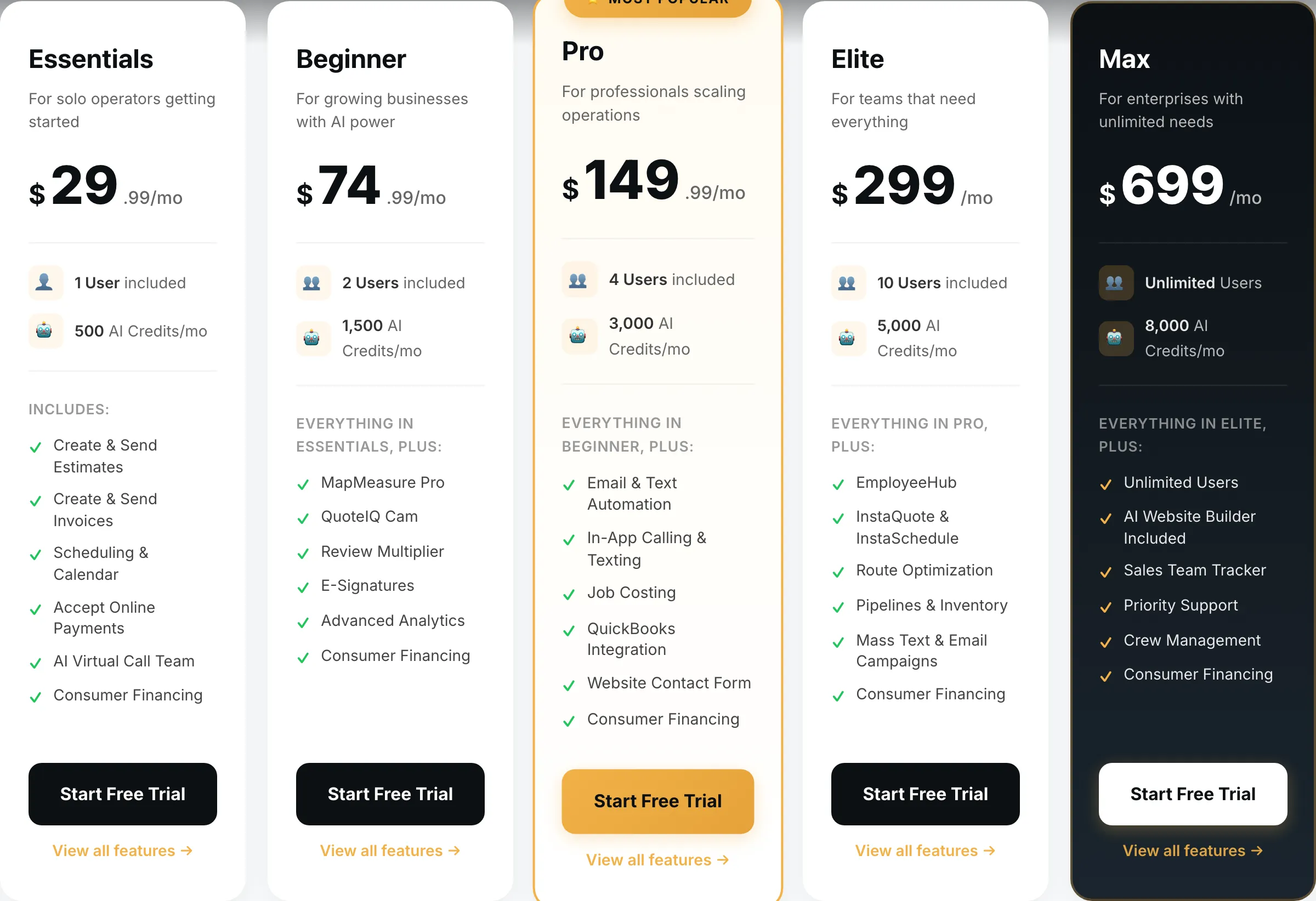
$29.99/mo gets a solo cleaner a working quote-to-invoice loop with card payments, which beats a notes app and a bank transfer.
Where it is weaker for this trade is exactly where cleaning lives: recurring scheduling and team assignment are thinner than Jobber’s, and there is no client self-service hub. Its headline feature, satellite property measurement, does nothing for you — you are not measuring square footage from space to price a kitchen.
For a solo cleaner with a stable client list, that is all survivable at a third of the price. For anyone with employees, spend the extra on Jobber.
What it does well
- Cheapest real entry point of anything in this category — $29.99 gets a working quote-to-invoice loop, not a crippled trial tier.
- MapMeasure Pro measures a property off satellite imagery, which is the actual job on a lawn, driveway or roof quote.
- Every tier includes the features. No add-on menu bolted on at checkout.
What it does badly
- Smaller company than the incumbents. Fewer integrations, and you will occasionally be the person filing the bug.
- Built around exterior and outdoor trades. If you run commercial mechanical, this is the wrong shape.
- Seat counts are tight below Elite — a four-person crew is already on the $149.99 tier.
Who it fits: Solo operator to a four-person crew, mostly exterior cleaning and outdoor work.
ServiceTitan — not this trade
Quote only · Large service operationsEnterprise field service management for multi-truck operations, sold through a sales process rather than a pricing page.
On the page because omitting the market leader would make it an advertisement.
It is built around skilled technicians running diagnostic service calls with price books, memberships and inventory. Cleaning is high-frequency, low-ticket, and almost none of that machinery applies. No published pricing, an annual contract, a paid implementation.
What it does well
- Nothing else touches it for a large operation: reporting, payroll, inventory, call tracking, financing at the door.
- Built for a business where somebody’s full-time job is dispatch.
What it does badly
- No published pricing, an annual contract and an implementation fee. This is not a tool a solo operator buys.
- For a one to four person crew it is the wrong product at any price — you would use perhaps a tenth of it.
Who it fits: Ten trucks and up, with an office manager whose job includes running the software.
How we picked
Prices read off each vendor’s own pricing page on 31 August 2026, at the no-commitment monthly rate with seats added.
For house cleaning we weighted recurring schedule handling, cost per additional cleaner — because this trade adds staff faster than almost any other on this site — and whether the customer can reschedule without phoning you.
We gave no weight to price books, inventory or equipment tracking. A cleaning business needs none of them, and tools that lead with those were built for a different customer.
We earn nothing from Jobber or ServiceTitan, and Jobber is the pick here.
What we would do
Solo, fifteen to thirty clients: QuoteIQ at $29.99, or nothing at all for a while longer.
Two to four cleaners: Jobber Core at $49 plus seats, upgrading to Connect at $139 when lockouts start costing you.
Five or more: Housecall Pro Essentials at $189, or Max at $329 once you pass six.
Run the trial through one real week including a sick day and a last-minute cancellation. Every tool handles a clean schedule; the one you want is the one that handles a broken one.
Questions operators actually ask
What is the best software for a house cleaning business?
Jobber for one to four cleaners — recurring jobs, team assignment and a client hub where customers can see and reschedule their own visits. Housecall Pro Essentials at $189/mo once you have five or more cleaners, mostly for the seats and the dispatch board.
How do I handle keys, codes and access notes?
As permanent notes on the client property record, not on individual jobs — that way whoever covers the visit sees them. Every tool here supports it. Be deliberate about who can see those notes: a door code sitting in a system a departing cleaner still has access to is a real liability.
Can these assign a two-person team to a job?
Yes, all four. The difference is cost. Jobber charges $29 per user, so a six-cleaner business is $49 + $145 = $194/mo on Core. Housecall Pro Essentials includes five seats flat at $189. That crossover at around five people is the single biggest factor in this decision.
How should I bill recurring cleans?
Charge per visit but bill monthly against a recurring job, and take card on file. Cleaning has thin margins and high visit frequency, so chasing forty small invoices a month will cost more in your time than the jobs are worth.
Do I need software if I clean on my own?
Not immediately. A solo cleaner with fifteen regular clients can run a calendar and a notes app. It starts paying once you hire your first cleaner, because that is when you stop being able to hold the schedule in your head and a missed visit costs you a client permanently.