Drywall estimating software: board counts or job quotes

Which one are you looking for
Commercial drywall takeoff loads a plan set, measures wall and ceiling areas, counts boards and produces a bid. On-Screen Takeoff, PlanSwift and STACK own that category, and it is worth its price when the counting itself is days of work. If you bid commercial off drawings, price those directly — we have not verified their pricing and will not guess.
Small-contractor quoting is different. On a house you can measure in an hour. Your estimating problem is not counting boards, it is making sure the finish level, the ceilings and the repairs are priced as separate visible lines rather than absorbed into one number.
That second problem is what the tools below solve.
What a drywall crew actually needs
Area-based line items for hang, tape and finish, so each stage is priced separately. Finish level as a choice, because Level 5 is materially more work than Level 4 and needs to be paid for. And multi-day job handling with deposits, because you buy the board.
| Tool | Starts at | Users included | Best for | Verdict |
|---|---|---|---|---|
| Jobber | $49/mo | 1 | One to four person crews | Area line items, multi-day jobs, deposits |
| QuoteIQ | $29.99/mo | 1 | Solo hangers | Cheapest; first-pass area measurement |
| Housecall Pro | $79/mo | 1 | Five or more | Five seats, proposal tiers |
| ServiceTitan | Quote only | Unlimited | Large service operations | Quote-only, service trades |
Jobber — best of these for a drywall crew
$49/mo · One to four peopleThe default field service platform for small home service businesses, and the one most operators compare everything else against.
Jobs run days, carry material and labour separately, take a deposit at approval and invoice the balance at completion. Optional line items on Grow at $199 let you present Level 5 as a tickable upgrade rather than a conversation.
Core is $49/mo plus $29 per seat. No takeoff, no board counting.
What it does well
- The most polished product in the category. Onboarding is fast and the mobile app is the one crews complain about least.
- Client-facing experience — booking page, quote approvals, payment — is a step above everything cheaper.
- Deepest integration list, so it fits whatever you already run the books in.
What it does badly
- The advertised entry price is one user. Seats are $29/mo each on every tier, so a three-person crew on Core is $107/mo, not $49.
- Automation that most operators consider essential — reminders, follow-ups — is Connect and up, a 2.8x jump from Core.
- Prepaid annual pricing is what the marketing quotes; the no-commitment monthly number is meaningfully higher.
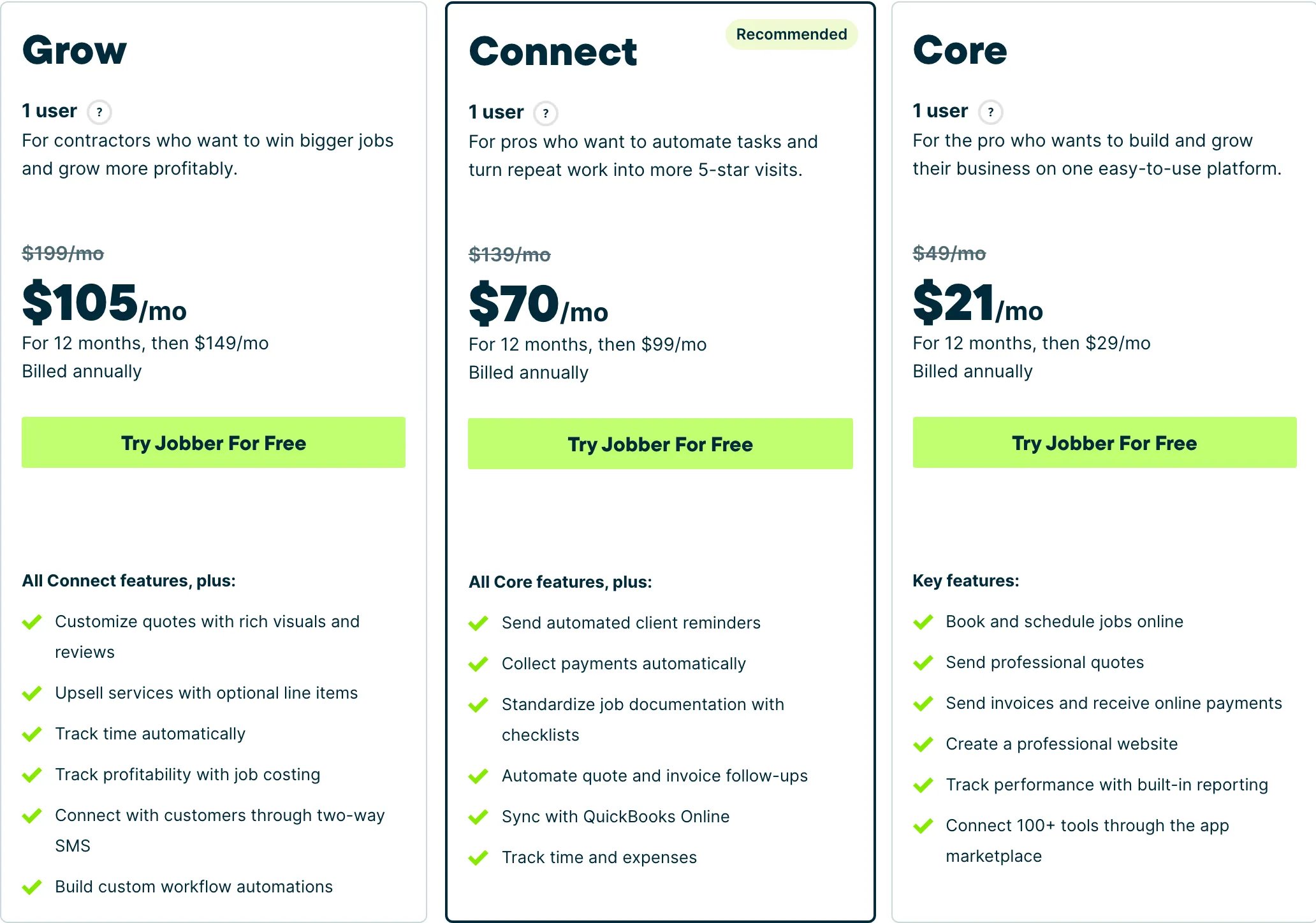
Who it fits: One person to a mid-size crew. The Core tier is genuinely usable solo; the useful automation starts at Connect.
QuoteIQ — cheapest option
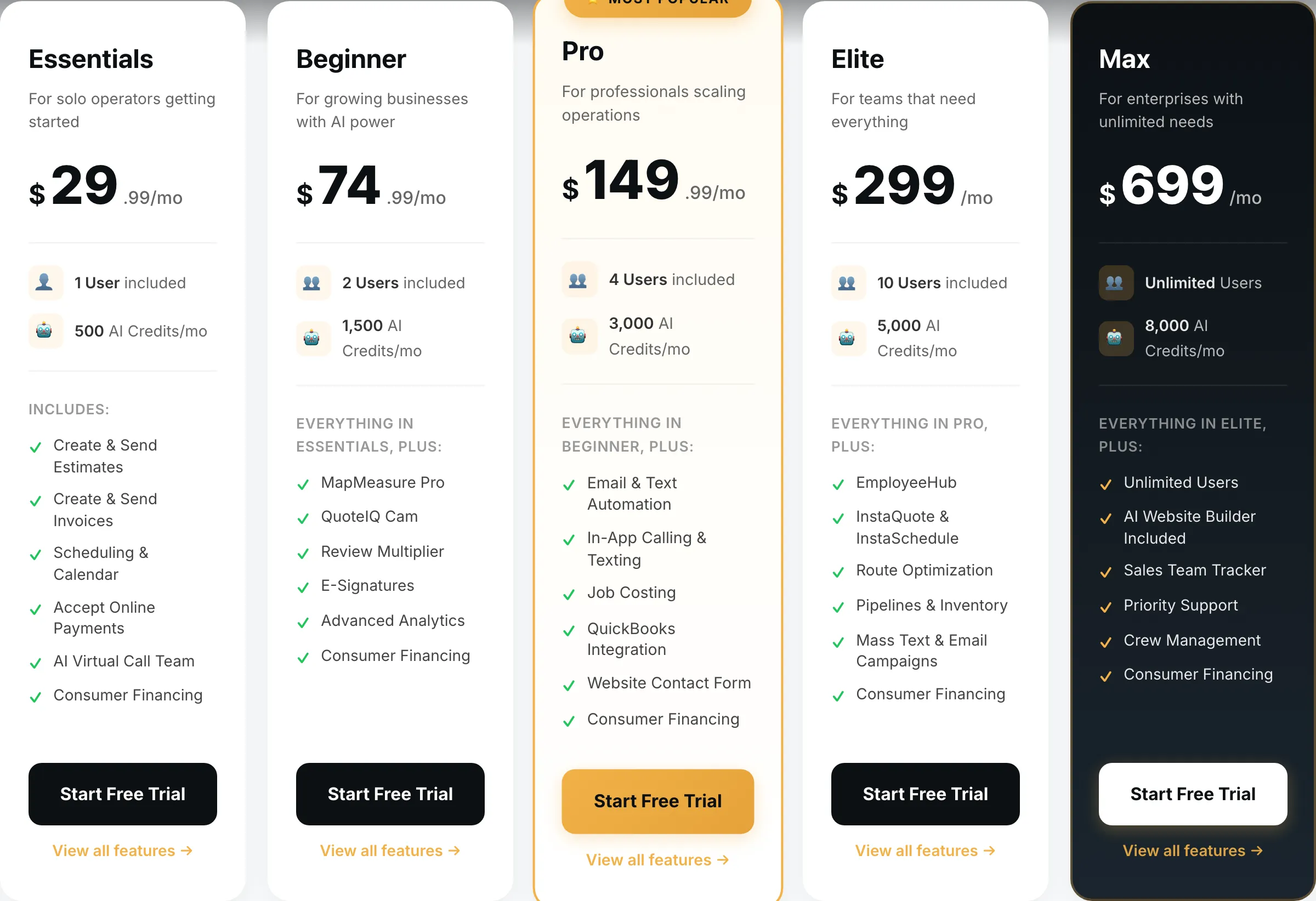
$29.99/mo · Solo hangers and finishersField service software built for exterior cleaning and outdoor home service crews, with property measurement baked into the quote.
$29.99/mo covers quoting, scheduling and invoicing. MapMeasure Pro gives you a building footprint, which is a rough first-pass input for a residential job but is not a board count and should not be treated as one.
What it does well
- Cheapest real entry point of anything in this category — $29.99 gets a working quote-to-invoice loop, not a crippled trial tier.
- MapMeasure Pro measures a property off satellite imagery, which is the actual job on a lawn, driveway or roof quote.
- Every tier includes the features. No add-on menu bolted on at checkout.
What it does badly
- Smaller company than the incumbents. Fewer integrations, and you will occasionally be the person filing the bug.
- Built around exterior and outdoor trades. If you run commercial mechanical, this is the wrong shape.
- Seat counts are tight below Elite — a four-person crew is already on the $149.99 tier.
Who it fits: Solo operator to a four-person crew, mostly exterior cleaning and outdoor work.
Housecall Pro — once you have a crew
$79/mo · Five or moreJobber’s closest competitor, priced for teams rather than solos, with stronger dispatch and marketing tooling.
Essentials at $189/mo includes five seats, which beats Jobber’s per-seat maths past four people. The Max proposal tool at $329 presents finish-level tiers cleanly.
Built for service trades rather than project work, so expect to bend it slightly.
What it does well
- Five seats included on Essentials is the best seat-per-dollar deal of the three once you are past two people.
- Dispatch and routing are stronger than Jobber’s at the equivalent tier.
- Recurring service plans on Max are genuinely good if you sell maintenance contracts.
What it does badly
- Worst entry price in the category: $79/mo for a single user, 60% more than Jobber Core for less.
- Extra seats on Essentials are $100/mo — the most expensive seat of any tool here.
- Add-on pricing is not published. You will get those numbers on a sales call, not off the website.
Who it fits: Two to eight people. The seat maths only starts working in your favour once you have a crew.
ServiceTitan is named here for completeness and is the wrong category — dispatched service calls, not project trades. No published pricing, an annual contract, a paid implementation.
How we picked
Prices read off each vendor’s pricing page on 31 August 2026, no-commitment monthly rate with seats added. We weighted staged area line items, finish-level presentation and deposits, and did not score takeoff, which none of these do.
We earn nothing from Jobber or ServiceTitan.
What we would do
Bidding commercial off plan sets: On-Screen Takeoff, PlanSwift or STACK.
Solo: QuoteIQ at $29.99.
Two to four: Jobber, Grow at $199 if finish levels should be a priced choice — and they should.
Five or more: Housecall Pro Essentials at $189.
Questions operators actually ask
What is drywall estimating software?
Two things. Commercial takeoff — On-Screen Takeoff, PlanSwift, STACK — measures wall and ceiling areas off drawings, counts boards, and produces a bid for a commercial job. Small-contractor quoting software prices a residential job by area and schedules the crew. Different products, different buyers.
How do I estimate a residential drywall job?
By square foot of board, with separate lines for hanging, taping and finishing, plus the finish level. Level 4 and Level 5 are very different amounts of work, and quoting them as one number is the most common way drywall contractors lose money on a job.
Do I need takeoff software for residential work?
Rarely. On a house you can measure from the plan or on site in reasonable time. Takeoff earns its price when you are bidding tens of thousands of square feet across a commercial plan set and the counting itself is days of work.
Should I quote finish levels separately?
Always. Present Level 4 as standard and Level 5 as a priced upgrade rather than absorbing it. Customers who want smooth walls under critical lighting should pay for the extra skim, and putting it on the quote as a choice is how you get paid for it.
What takeoff tools should I look at?
On-Screen Takeoff, PlanSwift and STACK come up most often for drywall. We have not verified their pricing, so there are no figures here — every price on this site is read off the vendor's own page and dated.